Thursday, February 28, 2013
Christy Miller Giveaway!
Guess what? I just received the first book (volume of four books, actually!) by one of my favorite authors for a review and giveaway! As I'm currently under the weather, the review will come a bit later - but the giveaway starts today! :)

Tuesday, February 26, 2013
Vintage Mail Maker {Review}
Read about Vintage Mail Maker and how it works here.

For my first letter, I chose old typewriter font, simple retro envelope, and simple retro paper. My message is a poem by Christina Rosetti:
'I dreamt I caught a little owl
And the bird was blue -'
'But you may hunt for ever
And not find such a one.'
'I dreamt I set a sunflower
And red as blood it grew -'
'But such a sunflower never
Bloomed beneath the sun.'
~ Christina Rosetti
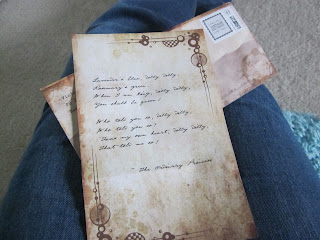
My second letter was set in female script with grunge envelope and paper. This time my message was a song quoted in an old children's book I love:
Lavender's blue, dilly dilly,
Rosemary's green,
When I am king, dilly dilly,
You shall be queen!
Who told you so, dilly dilly,
Who told you so?
'Twas my own heart, dilly dilly,
That told me so!
~ The Ordinary Princess

Envelopes: The envelopes were a bit too large and the pattern was a little off-balanced. The adhesive lines were plain white, which kind of bothered me - I felt like they should put the pattern on the entire envelope. However, I really liked that the inside of the envelope was printed and not white. Both envelope patterns were really nice and I liked the look of them. The addresses were printed in the old typewriter font - a nice touch.

Paper: I love that the paper was smaller than printer paper and looked like actual stationary, not like just a piece of paper I could print off. I didn't like that the print was only on one side, but it doesn't really matter since the actual messages/letters are one-sided and I planned to frame them and hang them up.

Printing/message: The font turned out just like online - neat, properly spaced, etc. My message was printed exactly as I typed it in.
I was provided two free letters, valued at $5.99 each, in exchange for this review. All opinions expressed are entirely my own.

For my first letter, I chose old typewriter font, simple retro envelope, and simple retro paper. My message is a poem by Christina Rosetti:
'I dreamt I caught a little owl
And the bird was blue -'
'But you may hunt for ever
And not find such a one.'
'I dreamt I set a sunflower
And red as blood it grew -'
'But such a sunflower never
Bloomed beneath the sun.'
~ Christina Rosetti

My second letter was set in female script with grunge envelope and paper. This time my message was a song quoted in an old children's book I love:
Lavender's blue, dilly dilly,
Rosemary's green,
When I am king, dilly dilly,
You shall be queen!
Who told you so, dilly dilly,
Who told you so?
'Twas my own heart, dilly dilly,
That told me so!
~ The Ordinary Princess

Envelopes: The envelopes were a bit too large and the pattern was a little off-balanced. The adhesive lines were plain white, which kind of bothered me - I felt like they should put the pattern on the entire envelope. However, I really liked that the inside of the envelope was printed and not white. Both envelope patterns were really nice and I liked the look of them. The addresses were printed in the old typewriter font - a nice touch.

Paper: I love that the paper was smaller than printer paper and looked like actual stationary, not like just a piece of paper I could print off. I didn't like that the print was only on one side, but it doesn't really matter since the actual messages/letters are one-sided and I planned to frame them and hang them up.

Printing/message: The font turned out just like online - neat, properly spaced, etc. My message was printed exactly as I typed it in.
I was provided two free letters, valued at $5.99 each, in exchange for this review. All opinions expressed are entirely my own.
Monday, February 25, 2013
Cappex.com {About/Review}
As part of a homeschool family, getting ready for and finding colleges is a somewhat different path for me than for public schoolers. Public high schools have guidance counselors and information about tests, colleges, financial aid, and who knows what else. Homeschoolers, on the other hand, have to seek out this information on their own. That's why I'm so thankful for two college help sites, one of which is www.cappex.com.
Cappex is easy to navigate and has all the tools you need to get started - or continue - your college search. I discovered Cappex after I'd already started by college lists and looked into several schools online, but I still found its services invaluable. I would recommend Cappex to anyone who needs any information about college! All that a login requires is a click from Facebook or your email and name. Once you've made an account, you fill out a profile with personal contact information, academic records (GPA, SAT or ACT results, etc.), extracurricular and volunteer activity (sports, music, etc.), and anything else you think colleges should know about you.
The first of Cappex's awesome tools is the My Colleges tab. This is a bit like an email inbox - once you've made your profile, colleges can see your information (not contact info, but academic, volunteer, extracurricular, etc.) and send you a message if they think you'd be a good fit for them. Then, you can read their message as well as Cappex's information about that school. If you're interested, you click "yes!" and Cappex sends your contact information to the school so they can call, email, or snail-mail you. If you're not, just click "no" and the message will simply vanish. :) Underneath your inbox is a list of colleges you've clicked yes for. (You can also search for colleges by name or criteria and add them yourself.)
Then there's the Chances and Visits tabs. The Chances tab: Once you've added schools to your My Colleges tab, the schools' information and your profile information are compared to tell you how high your chances are of being accepted by individual schools. The Visits tab: put in when you want to go on a trip, with who, and to what schools. This tool then maps out the best route and gives you trip and driving time! You can save drafts of trips, or you can complete a trip and send messages to the schools you want to visit to set up plans.
Cappex also has an Apply and a Scholarships tab. I have yet to use the Apply tab, but as the name suggests, it's intended to help you apply to the schools on your list. The Scholarships tab was the first one I used as a new Cappex user. It finds scholarships that seem to match your profile, and you can see the requirements and eligibility factors. Then you can pick from a drop-down menu whether you will, might, already did, or will not apply; if you won or lost; or if the scholarship doesn't fit you. Cappex saves two separate lists of scholarships you will/might apply to and scholarships that you will not apply to or that don't fit, for your reference. There are also a few scholarships Cappex sponsors, for which if you are eligible you just click enter and your profile is your application!
The Home page has lots of other tools - like the search feature I already mentioned, a merit aid dictionary, or compare colleges. But my favorite feature of Cappex is not a tool; instead it's a fun program called the Cappex Cap Challenge. See, whenever you log in for certain holidays, use certain features of Cappex, check out Cappex's 'friend' websites, and reach other achievements, you get a virtual cap. And once you reach a certain number of caps, you unlock a level of the Cap Challenge - from Newbie to Rising Star to College Pro to finally Rock Star. Each level unlocks a new scholarship, and the final Rock Star level earns you an actual orange Cappex ball cap in the mail!
So there you have it - the ins and outs of one of the most helpful websites on the net!
Cappex contacted me requesting a review and promising me a Cappex ball cap in exchange for a review. All opinions expressed are entirely my own.
Cappex is easy to navigate and has all the tools you need to get started - or continue - your college search. I discovered Cappex after I'd already started by college lists and looked into several schools online, but I still found its services invaluable. I would recommend Cappex to anyone who needs any information about college! All that a login requires is a click from Facebook or your email and name. Once you've made an account, you fill out a profile with personal contact information, academic records (GPA, SAT or ACT results, etc.), extracurricular and volunteer activity (sports, music, etc.), and anything else you think colleges should know about you.
The first of Cappex's awesome tools is the My Colleges tab. This is a bit like an email inbox - once you've made your profile, colleges can see your information (not contact info, but academic, volunteer, extracurricular, etc.) and send you a message if they think you'd be a good fit for them. Then, you can read their message as well as Cappex's information about that school. If you're interested, you click "yes!" and Cappex sends your contact information to the school so they can call, email, or snail-mail you. If you're not, just click "no" and the message will simply vanish. :) Underneath your inbox is a list of colleges you've clicked yes for. (You can also search for colleges by name or criteria and add them yourself.)
Then there's the Chances and Visits tabs. The Chances tab: Once you've added schools to your My Colleges tab, the schools' information and your profile information are compared to tell you how high your chances are of being accepted by individual schools. The Visits tab: put in when you want to go on a trip, with who, and to what schools. This tool then maps out the best route and gives you trip and driving time! You can save drafts of trips, or you can complete a trip and send messages to the schools you want to visit to set up plans.
Cappex also has an Apply and a Scholarships tab. I have yet to use the Apply tab, but as the name suggests, it's intended to help you apply to the schools on your list. The Scholarships tab was the first one I used as a new Cappex user. It finds scholarships that seem to match your profile, and you can see the requirements and eligibility factors. Then you can pick from a drop-down menu whether you will, might, already did, or will not apply; if you won or lost; or if the scholarship doesn't fit you. Cappex saves two separate lists of scholarships you will/might apply to and scholarships that you will not apply to or that don't fit, for your reference. There are also a few scholarships Cappex sponsors, for which if you are eligible you just click enter and your profile is your application!
The Home page has lots of other tools - like the search feature I already mentioned, a merit aid dictionary, or compare colleges. But my favorite feature of Cappex is not a tool; instead it's a fun program called the Cappex Cap Challenge. See, whenever you log in for certain holidays, use certain features of Cappex, check out Cappex's 'friend' websites, and reach other achievements, you get a virtual cap. And once you reach a certain number of caps, you unlock a level of the Cap Challenge - from Newbie to Rising Star to College Pro to finally Rock Star. Each level unlocks a new scholarship, and the final Rock Star level earns you an actual orange Cappex ball cap in the mail!
So there you have it - the ins and outs of one of the most helpful websites on the net!
Cappex contacted me requesting a review and promising me a Cappex ball cap in exchange for a review. All opinions expressed are entirely my own.
Saturday, February 23, 2013
The Pinterest Report: No-Heat Hair Curling

Week Fourteen: No-Heat Hair Curling
{all photos linked to source}
The Pin:

no-heat wavy hair tutorial
The Link:

The Test:
What you'll need: Wet hair and time.
What to do: Separate your hair like into pieces, like you would to curl it with an iron. Then twist each piece completely, like this:

Then let it dry naturally, making sure it stays twisted up. It should curl beautifully.... according to the original link, anyway.
These are my results:

immediately after taking out the dry twists

a short while later
The Grade:
As you can see above, it did not work. At. All.

Friday, February 22, 2013
Firmoo Winners
For the Firmoo online glasses retailer giveaway, we had great results! Over 100 entries! So now it's time to announce the six winners of store vouchers and the grand prize winner of a free pair of glasses!
The winners of a $30 voucher to designer glasses are...
Holly Storm-Burge!
Jessica Sage!
Jennifer Alice Duran!
Rab Pom!
Sue Bunting!
and
Aimee Webber!
And, finally, the grand prize winner of a free pair of any non-designer glasses (excluding sunglasses) is...
*Drumroll!*
Amanda Starr!
Congratulations! I'll be emailing the winners to send off the voucher codes and get the grand prize winner in touch with Firmoo. :)
Thursday, February 21, 2013
Vintage Mail Maker {About}
I've mentioned before that I'm good real-life friends with Kathryn at Singing Through the Rain. A while back she was contacted by someone from Vintage Mail Maker about being the first to work with them as a blogger affiliate. After writing several posts, she ran out of ideas to blog about them - so she suggested I contact them and offer a new blogging outlet! The man I corresponded with was very happy to offer two printed letters for free for a review.

Here's how Vintage Mail Maker works: you choose one of three fonts, one of three envelopes, and one of six papers. Then you type a message and, if you want, add photos that it sets to sepia or black and white (your choice). Finally, type in the sender and recipient information and your letter is complete! Then you can decide whether you want to email the letter (free) or have Vintage Mail Maker print and mail it traditionally ($5.99). You also have the option to donate to Vintage Mail Maker and/or to include your letter in their public gallery. Once you've completed your order, an embed code for your letter is offered on the webpage and a confirmation email is sent to your inbox if you chose the email option.
 When sent by email, the recipient will see the envelope and letter on a webpage with links to the general Vintage Mail Maker site and the create a letter page for them to reply. You will receive an email when the recipient opens their letter online.
If you need inspiration or want to see what others put in their letters, the workers at Vintage Mail Maker keep a blog with all sorts of ideas!
Next week I'll be back with images of my mailed letters and my review!

Here's how Vintage Mail Maker works: you choose one of three fonts, one of three envelopes, and one of six papers. Then you type a message and, if you want, add photos that it sets to sepia or black and white (your choice). Finally, type in the sender and recipient information and your letter is complete! Then you can decide whether you want to email the letter (free) or have Vintage Mail Maker print and mail it traditionally ($5.99). You also have the option to donate to Vintage Mail Maker and/or to include your letter in their public gallery. Once you've completed your order, an embed code for your letter is offered on the webpage and a confirmation email is sent to your inbox if you chose the email option.
 When sent by email, the recipient will see the envelope and letter on a webpage with links to the general Vintage Mail Maker site and the create a letter page for them to reply. You will receive an email when the recipient opens their letter online.
If you need inspiration or want to see what others put in their letters, the workers at Vintage Mail Maker keep a blog with all sorts of ideas!
Next week I'll be back with images of my mailed letters and my review!
Tuesday, February 19, 2013
My Mission
Last week, I reviewed a book titled Wake Up, Generation by Paige Omartian. In that review I mentioned her focus on the reader's finding his or her individual mission in life:
Since I feel like this book and my discovery through it of my mission is closely related to my word for 2013, I decided that today I would share my mission statement and ways I will/I could/I have already live(d) it out.
My Life Mission Statement: My mission is to live out a love of children in order to inspire a value of tomorrow's citizens in society.
How I Already Live It: Volunteering in church nursery; babysitting, both paid and free; donating hair for wigs for cancer kids; donating money for Bibles for students in Fiji; volunteering in kids' church programs; volunteering in vacation Bible schools; working in a week-long camp for kids in Dominica.
Other Ways I Could Live It: Sponsoring a child; donating money to Make-A-Wish; visiting children in the hospital; becoming a teacher.
I'm participating in Melanie's Monthly One Word Linkup Party. Join us!

The focus on a personal mission was the best point of the book, I think. In my mind, my word for 2013 - "dream" - can be used to refer to goals, but it can also be used as another word for vision, passion, mission. So this book seems to resonate well with my dreams of this year for me!Paige also talks about this focus on life missions on her website: http://www.paigeomartian.com/paige/how-do-i-find-my-purpose/
 |
| {via} |
Since I feel like this book and my discovery through it of my mission is closely related to my word for 2013, I decided that today I would share my mission statement and ways I will/I could/I have already live(d) it out.
 |
| {via} |
My Life Mission Statement: My mission is to live out a love of children in order to inspire a value of tomorrow's citizens in society.
 |
| {via} |
How I Already Live It: Volunteering in church nursery; babysitting, both paid and free; donating hair for wigs for cancer kids; donating money for Bibles for students in Fiji; volunteering in kids' church programs; volunteering in vacation Bible schools; working in a week-long camp for kids in Dominica.
 |
| {via} |
Other Ways I Could Live It: Sponsoring a child; donating money to Make-A-Wish; visiting children in the hospital; becoming a teacher.
 |
| {via} |
I'm participating in Melanie's Monthly One Word Linkup Party. Join us!
Subscribe to:
Posts (Atom)